
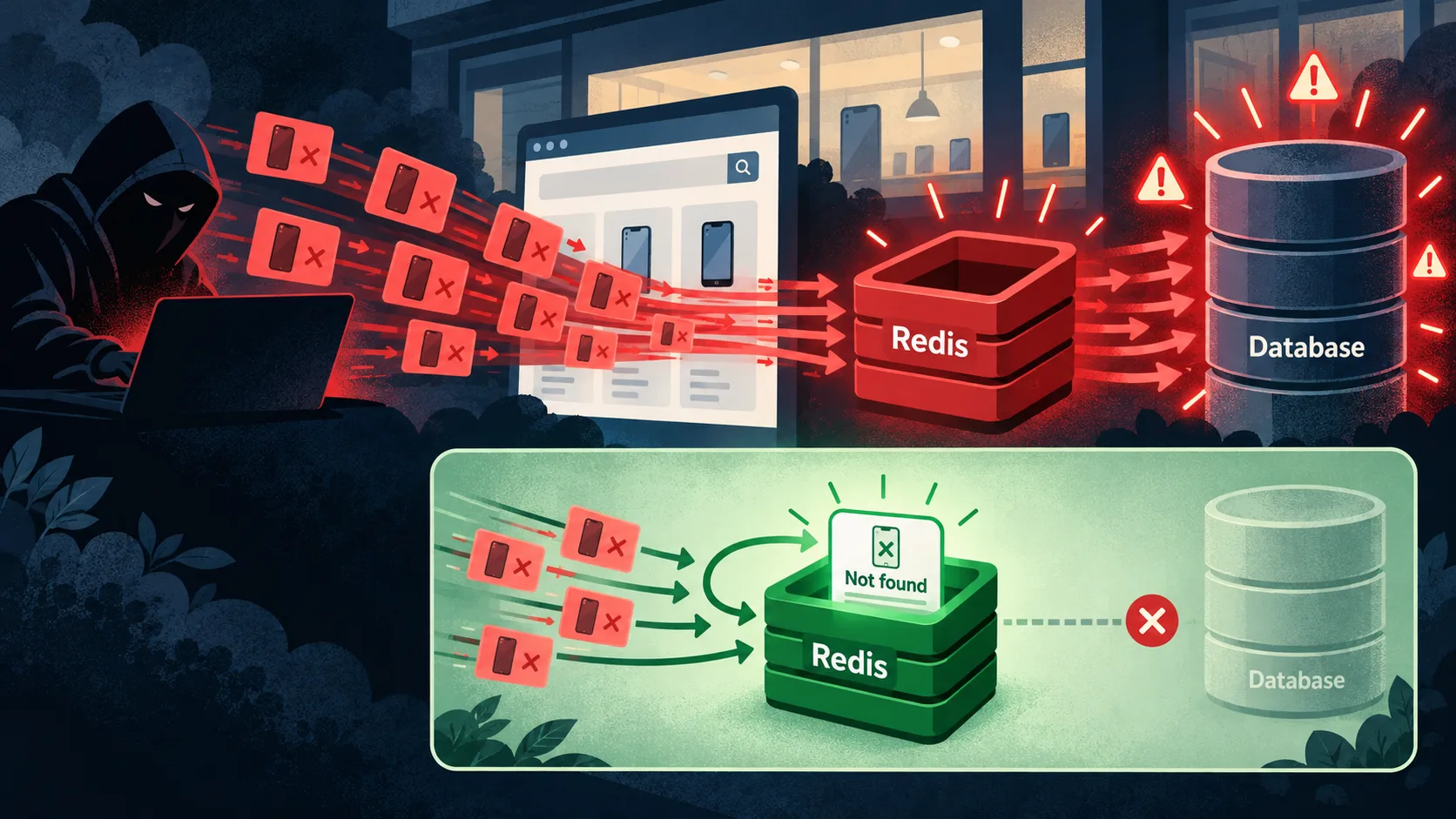
Imagine running an online mobile-phone shop.
It’s Friday evening. Your weekend sale has started, customers are browsing, and orders are coming in. Then your support team sends a message:
“Product pages are taking forever to load.”
You check the dashboard. Database connections are climbing. Requests are piling up. Yet Redis is responding quickly.
You added caching to keep the database from getting overwhelmed. So why is it struggling?
This is an illustrative story, not a report of an actual incident.
How the shop normally works
When a customer opens a product page, the application first checks Redis:
Customer → Application → Redis
                           │
                       Cache miss
                           ↓
                        Database
Suppose product 125 is a phone that exists in your catalogue.
On the first request, Redis has no cached entry. The application queries the database, finds the product, and stores it in Redis. Later requests can use the cached copy.
In simplified Redis commands:
SET product:125 '{"id":125,"name":"Example Phone"}' EX 300
GET product:125
The EX 300 option makes the cached value expire after 300 seconds. Redis supports setting the value and its expiration in the same command. Redis SET documentation
Think of Redis as the employee at the shop’s front counter. Once they have a product’s details, they can answer customers without repeatedly asking someone in the stockroom.
The attacker finds a gap
An attacker wants to make the website unavailable.
Instead of requesting popular phones, they repeatedly request a product that doesn’t exist: product 999999.
Here is what your application does:
Request product 999999
  → Redis has no entry
  → Database searches for the product
  → Product does not exist
  → Application returns 404
  → Nothing is stored in Redis
The next request follows exactly the same path.
The application remembers successful lookups, but forgets unsuccessful ones.
It’s like someone repeatedly asking the front-counter employee for a phone the shop has never sold. Every time, the employee walks back to the stockroom to check again.
A single missing-product request is ordinary. A sustained flood can consume database connections, CPU, and application resources. Real customers then wait behind work that produces the same answer: “Not found.”
The database might answer an individual indexed lookup quickly. The danger comes from the volume and the capacity of the whole system.
This is cache penetration
Cache penetration happens when requests for nonexistent data miss the cache and repeatedly reach the underlying database.
Redis hasn’t malfunctioned. The application has simply never given it an answer to remember.
An attacker can exploit this behavior, but attacks aren’t the only cause. Broken links, outdated bookmarks, and buggy integrations can generate these requests too.
Let Redis remember “not found”
The first improvement is called negative caching: cache the fact that a product was not found.
For example:
SET product:999999 '{"found":false}' EX 60
For the next 60 seconds, the application can read this entry and return a 404 without another database lookup:
First request → Redis miss → Database → Cache “not found”
Next request  → Redis hit  → Return 404
The cache now has two useful answers: “Here is the product” and “We recently checked; that product doesn’t exist.”
Here is simplified JavaScript-style application logic. The Redis helpers wrap GET and SET key value EX seconds; the database helper returns a product or null.
async function getProduct(id) {
  // Validate and normalize the ID before building a cache key.
  const productId = normalizeProductId(id);
  const key = `product:${productId}`;

  const cached = await cacheGet(key);

  // A missing Redis key differs from a cached "not found" answer.
  if (cached !== null) {
    const entry = JSON.parse(cached);
    return entry.found ? entry.product : null;
  }

  const product = await findProductInDatabase(productId);

  const entry = product === null
    ? { found: false }
    : { found: true, product };

  const ttlSeconds = product === null ? 60 : 300;

  await cacheSetWithExpiry(
    key,
    JSON.stringify(entry),
    ttlSeconds
  );

  return product;
}
The route returns HTTP 404 when this function returns null. These helpers are illustrative, not a complete production implementation.
Only cache a confirmed absence. A database timeout or connection failure does not mean the product doesn’t exist.
Use a short expiration for negative entries. If a product is created shortly afterward, an old “not found” entry could briefly hide it. Clear or replace that entry after a successful creation, and account for concurrent reads and writes in production.
What if the attacker changes the product ID every time?
This is where negative caching reaches its limit.
If requests target 999999, 999998, 999997, and so on, each new ID can still cause a database lookup. The attacker may also fill Redis with useless negative entries.
Two additional defenses help.
Rate limiting restricts how much request traffic reaches the application. Apply sensible limits at the edge or gateway and consider multiple signals; a per-IP limit alone may be insufficient against distributed traffic.
A Bloom filter acts like a compact catalogue membership check. Before querying the database, the application asks whether the ID could exist.
Its answers are:
- Definitely absent: skip the database lookup.
- Possibly present: continue through the normal cache/database flow.
Bloom filters can return false positives, so “possibly present” is not proof that a product exists. Redis Bloom filter documentation
Build the filter from existing product IDs and keep it updated when products are added. The mathematical guarantee assumes items have been inserted: an incomplete or stale filter can incorrectly reject a real product at the application level.
Keep the protections working together
For this shop, a practical request path could be:
Request
  → Rate limit
  → Validate and normalize ID
  → Redis cache
      → Cached product: return product
      → Cached absence: return 404
      → Cache miss:
          → Ready Bloom filter says absent: return 404
          → Otherwise: query database and cache the answer
Use the Bloom filter only when it is available and populated. Monitor missing-product traffic, database query volume, and cache memory. Negative entries need a memory budget as well as an expiration.
Simultaneous requests can also arrive before the first negative entry is written. Request coalescing can reduce those duplicate lookups.
A distinction worth remembering
| Problem | What happens |
|---|---|
| Cache penetration | Nonexistent data repeatedly reaches the database. |
| Cache stampede | Many requests hit the database together for the same uncached or expired item. |
| Cache avalanche | Many cache entries expire or become unavailable together, creating a broad surge of database traffic. |
The shop’s lesson is simple: “Not found” is an answer worth remembering.
Caching popular products protects the database during ordinary browsing. Caching confirmed missing results, controlling request volume, and checking catalogue membership help protect it when someone keeps asking for products that were never on the shelves.